Showing posts with label avermedia. Show all posts

Tuesday, 14 July 2015

AVerMedia Live Gamer Portable C875 Review


Too lazy to take my own picture, sorry.

Anyway, two reviews in a week? What is this sorcery!

Well basically the capture card market is standing still right now. Nothing new has been released in months since the Live Gamer Extreme, so I've decided to look at older cards.

Installation and setup

Nothing to really say with the installation, it's USB2. Plug it into a spare USB2 (or USB3) port. Download the software and drivers from AVerMedia's GamerZone website and that's it.

RECentral Software

If you read my Extreme review, you know how much I hate when manufacturers give the user ample configuration over stuff such as resolution and frame rate but weirdly, I don't mind it too much here. The user interface is really slick and it flows together really well and it keeps you in check most of the time... I like... this. I never thought I'd be saying like and AVerMedia in the same sentence but here we are.

What I am really perplexed about is that in this older version of RECentral, selecting 60 for the frame rate actually outputs you a correct console 59.94 fps video. Why does the newer software not do this?

Live Stream Engine

I really wish more manufacturers who use tailored capturing software for their device (e.g. Elgato) would use something similar to this. The live stream engine basically acts similar to AmaRecTVs live function in which you can locally record while piping the video to XSplit/OBS. It's really great and works well.

The problem (which really isn't a problem since we're not supposed to be doing this) is that HDCP is still enforced over live stream engine. Maybe the guy can patch this additional program but for now you will still need HDCP stripping if you are live streaming the PS3.

I should also say that I have been able to use live stream engine to pipe DirectShow video into AmaRecTV but I wouldn't advise it. AmaRecTV crashed often when selecting device information but I was glad they used YUY2 sampling at least. The problem is that the stream engine quality is dictated by what bit rate you set in the stream engine, so you may as well not bother as recording x264vfw lossless or equivalent would not gain you any extra quality.

HDMI capture quality

With proper 59.94 fps recording and 60 Mbps, there's no issue with HDMI capture quality for sure.

Component capture quality

Unfortunately I can't say the same for Component. It's very bad and the colors are completely wrong. Not just because they flagged BT.709 for everything, it's much worse than that.

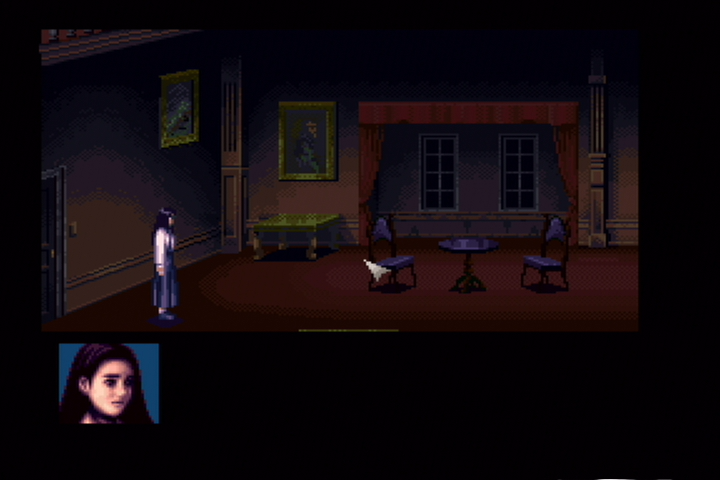
Again, we are back to the Clock Tower test to illustrate my point.

The top 2 are what I would consider "good" Component capture. Click to enlarge all pictures.

Blackmagic Shuttle
Live Gamer Extreme
Live Gamer Portable
Notice that the colors are all wrong on the portable and pay close attention to the curtains and the floor. The gradients are completely lost, as is detail.

Of course Component is converted to HDMI for passthrough which is lagless as far as I can tell, other reviews say the same thing. I did hear reports that sometimes the passthrough will go black for a couple of seconds but I didn't experience it on this particular unit. I have however seen other units exhibit this problem. It only seems to effect Component video though, most notably the Wii.

Microphone/headphone ports

Didn't bother to test the microphone port since nobody should ever use it. I did however play around with the headphone port and it's actually really nice. To have a port so close to you instead of having to constantly plug the headphones into the back of my monitor is amazing. I wish more manufacturers would do this and it's definitely a plus point for the device.

Preview latency and lag

I was very surprised by the preview latency for a USB2 device. The latency was around 8-9 frames on my laptop. Not good enough to do any serious gaming on but probably fine that you wouldn't need to delay your microphone when live streaming.

I do however have a pretty big issue left to discuss. When watching the preview, it dropped a lot of frames. For example, I made Ryu do a jumping roundhouse kick on Dan (Super Street Fighter IV) and the preview window of XSplit completely missed the whole animation of his kick. He jumped and then suddenly he was on the ground. The significant frame drops seem to happen every 30-40 seconds that it's a real problem when live streaming as your viewers will see this. I should note that the passthrough is perfect and does not exhibit any of these issues.

I actually thought it might be a problem with my USB3 ports but I plugged in my Elgato and that was perfectly fine and I saw no frame drops.

Conclusion

A pretty decent try from AVerMedia with some cool features but the bad Component capture along with constant frame drops on the preview makes this product very hard to recommend. If you are in the market for a USB2 solution, I'd highly suggest the Elgato Game Capture HD over this.

Friday, 10 July 2015

AVerMedia Live Gamer Extreme GC550 Review

November 2016 Update: The frame rate issue has now been fixed, the card can now properly record 59.94 content.

Let's see what AVerMedia's latest product has to offer. I've never really been a fan of AVerMedia but let's give them a second... no third try.

Package and Contents

First a picture of the outer packaging. Click to enlarge all pictures.


Nothing too amazing here compared to some other products I've seen but it doesn't really matter what it looks like. I'd be happy with a plain white box. The side also tells us the contents.


Package Contents:

Live Gamer Extreme Capture Card
USB 3.0 Cable
3.5mm Audio Cable
HDMI Cable
Component Breakout Cable
Component to PS3 Cable
Quick set up guide
Backup screw and Exclusive cover

That last one... yeah I don't know what they are thinking here. I don't want to print out a design and put it in my capture card. I want to you know... play and capture my gameplay. As you can probably guess, this device will capture HDMI and Component video.

Installation

The installation was rather easy. Just download the latest software and drivers from AVerMedia's site and then click past a wizard. It's then just a case of plugging in the USB3 cable and after about 10 seconds, the device will be installed and ready for use.

DirectShow layout and options

When I first learned about the device I was really confused if it was DirectShow or not but fortunately I can confirm it is. However, this leads us to the first big problem with the device. This is what AmaRecTV provides us in the Device tab configuration.


We're stuck at 60.00 fps and you cannot change this as AmaRec will spit out errors. It's pretty common knowledge that all HDMI consoles output 59.94 and nothing else. The only thing they got right here was using YUY2 sampling. The selection does not change when you choose Component either.

Clicking Device Setting brings us the DirectShow interface.


Here you can select video input between HDMI and Component as well as mix in the audio sources from aux or microphone. You will however notice that changing HDMI range levels is not selectable here. In order to change between 0-255 and 16-235, you must do it in the RECentral software and then this setting will stick when you reopen AmaRecTV. Not the most elegant solution but it works. I'd like to see the color range selectable on the DirectShow interface for future updates.

USB3 Capturing, preview and latency

I think USB3 capture cards have gotten a bad name from the Blackmagic Shuttle but don't let that put you off buying another brand. I am pleased to say that this device handles 1080p60 without any frame drops or lagging. The fps view display in AmaRec is a tad more erratic than I'd like, but still decent. It will hover between the ranges of 59.88 and sometimes go up to 61.

The preview is described as "Ultra-low Latency" but watch this video I put together.


That's definitely not ultra low. What is weird is that the RECentral software is much laggier than the AmaRecTV preview, by about 2 frames. The approx 2 frames of AmaRecTV is acceptable to describe as low but I personally would not call it "ultra low".

RECentral 2 Software

The RECentral 2 software is pretty bare bones and I personally don't like it as they give the user too much customization. For example, you can capture a 480p source at 1080p and select a configurable frame rate. You should always capture native res and framerate which AVerMedia is not enforcing here. This will always lead to the end user making mistakes or forgetting they set 720p when they were capturing a 480p source. I should also state that 59.94 is also not an option here.

You can however record upto 60 Mbps and AAC up to 256 kbps. No idea why manufacturers don't want us to go to 320 kbps with audio but it's probably because 256 kbps is good enough for stereo sound. The only container format you can choose is mp4 which I have no issue with. Gives great compatibility with almost every editing program and you shouldn't have any problems. It is however limited to YV12 which I guess I can't blame them for.

Another review said the software was constantly crashing but I didn't get one crash and was always stable. Might have been user error or operating system/hardware dependant.

HDMI capture quality

It's HDMI... it's supposed to be good. No complaints here besides color range being awkward to select as mentioned previously. Would also like 59.94fps selectable in the future updates.

Component capture quality

I'm actually very surprised to say the quality is far better than I expected, especially after the abysmal quality of the H727E. It's definitely on par with the other top cards out right now like the Elgato and Micomsoft. Here is Donkey Kong Country 480p from the Wii Virtual Console with the top 3 cards. Apologies for not the same frame but you get the idea.

AVerMedia GC550
Elgato
Micomsoft
When evaluating Component capture, I always like to do a test I call "The Clock Tower". It's the beginning scene I've spent the most time analysing over all the cards I've ever owned.

AVerMedia GC550
Blackmagic Shuttle
As we can see, the AVerMedia is pretty much identical to the Shuttle which we know to be correct. These screenshots are the closest to the emulator colors you will get. I actually might go as far to say the GC5500 is the best Component capture solution.

I should also note here that the Component to HDMI passthrough is lagless as far as I can tell.

Heat

After about an hours use, the card got pretty hot at the base. It wasn't so uncomfortable you couldn't keep your hand there but I'll need to do a thorough test of 5-6 hours use to know if it will cause any problems over longer sessions.

Extras

I know this is a rather short review but I just wanted to get the main points down. I could write an extra page or so evaluating other stuff but I don't feel the need when it can't even get the basic functions correct.

Conclusion

It's not a bad effort from AVerMedia and your casual user probably doesn't even care about the problems I listed. If you're just looking for a good external capture solution, I'd probably recommend picking this up. However, if you really care about getting correct frame rates and ease of use, I'd look elsewhere or at least wait till the drivers and software are updated to fix these issues... if they ever are. Even if it is the best Component capture solution, doesn't mean anything if your frame rates are wrong.

I will say that the price is very appealing and might sway some users into buying it. I was able to pick this up from Amazon for £110. That's pretty crazy for a YUY2 1080p60 solution.

Saturday, 25 January 2014

AVerMedia HD DVR C027 (H727) Capture Card Review

Please note that the C027 is exactly the same as the European model (H727) but that has an aerial attachment for TV. If you are interested in the H727E model then read the update at the end.

avermedia c027 h727 capture card review
AVerMedia C027 - Image courtesy of Amazon.com

This offering from AVerMedia can be considered good and why shouldn't it be? It offers a connection input for just about anything you could ask for; Composite, S-Video, Component and HDMI. Couple that with DirectShow drivers (fully AmaRecTV, XSplit and OBS compatible) and support for the YUV 4:2:2 (YUY2) color space and you have everything you need... right?

Well to put it simply, no. Although on the surface it seems good, once you actually compare it to other devices you begin to notice the weaknesses this capture card has. I am personally very picky on video capture quality so I will explain what you should consider before purchasing this.

Composite: Don't get me wrong, nearly all composite capture cards will look bad but this one is strange. When I previewed the intro to Zelda: A Link to the Past on SNES, I couldn't help but notice the water was not properly being displayed. I compared it to other composite capture cards such as the Dazzle DVC 100 and EzCAP. Both of these capture cards were able to show the water properly so I can only blame the Aver card. The inclusion of a 3D comb filter would have helped massively for composite sources but this is nearly always neglected on capture cards of this price.

S-Video: Moving up the quality standard does help but it brings me onto the next point. The Aver is able to record from retro consoles (240p) such as the NES, SNES and Genesis. One issue of retro consoles is that they do not output a proper frame rate. This leads the Aver to briefly jump up and down about two pixels every so often. It's not a big issue but again other devices such as the Dazzle and EzCAP do not show this. This is one thing to consider if you are primarily looking at retro game capturing.

Component: On the surface the component capture seems good. However, when I compared it to other component devices I know to be accurate (such as the Blackmagic or Micomsoft products) you can tell the capture is just too dark. You can fix this in post processing (or even by tweaking the driver) but I do not believe in that sort of stuff. The capture card should be able to handle everything on default settings.

HDMI: The original H727 model (with capacitors) only accepts 16-235 (Limited range) input. The H727E model was changed to accept 0-255 (Full range) input. It looks great, just like any other HDMI capture card.

The last disadvantage to discuss is the lack of a video pass through to play lag less on a monitor (as the preview window has noticeable lag). This means you will have to invest in splitters or distribution amplifiers. There are very few capture cards that actually offer a pass through feature so it can't really be a big reason for not buying this capture card. What is a good reason for buying this capture card is that it supports 480p over Component which more expensive cards like the Blackmagic Intensity Pro do not. This is very useful if you are capturing video from a Nintendo Wii.

I know I just spent pretty much all of the review criticizing this device but I do have really high standards for video capture quality. If you are just looking for a relatively inexpensive capture card and don't mind not having reference quality video, this card will do just fine and you should buy it.

Update: While doing more research I actually discovered that in early 2013, AVerMedia changed the PCB of the H727 to a "Version. E" (which is called H727E). This new model is easily identified as it has no capacitors on the PCB and the grey FM tuner chip size has been reduced significantly.

I discovered that the Component capture is very dark but also has some severe colour bleeding that is not present in the older model. I contacted AVerMedia about this and in May 2014 they recognized the problem and will release a new driver to fix Component capture. I keep a look out for new drivers every few days and I'll update this if a driver comes out to fix it.

Update 2: AVerMedia allowed me to preview some beta drivers to see if the problem was fixed. I am sad to say that the attempt was very bad. As of November 2014, no new drivers have surfaced. There exists so much better alternatives that I would only buy this capture card if you only needed HDMI capture ability.